Parallels Desktop 5.0 review
Parallels has once again updated its virtualisation software for the Mac. Is it worth upgrading to? We review it to find out.
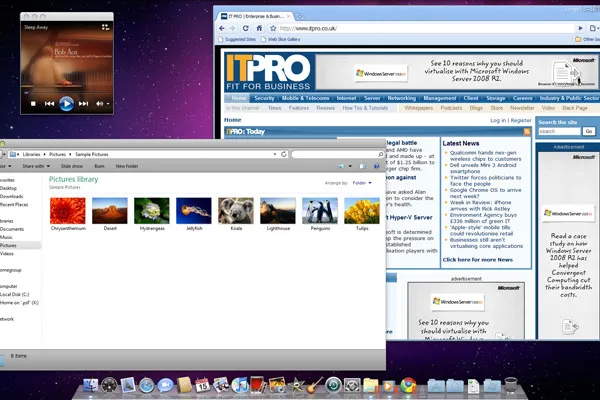
Parallels users who are owners of the previous version will most likely get by without upgrading, especially as version 4 is compatible with Snow Leopard.Equally, less frequent virtualisation users may also be content with a less sophisticated alternative such as the free and open source VirtualBox. However, if you’re a regular user, then this is definitely a worthwhile purchase.
Parallels Desktop 5 is the latest version of the virtualisation program that enables you to run other operating systems and their applications on a Mac alongside the MacOS. Version 5 includes several refinements that are designed to make it easier to run Windows and Windows applications on your Mac, while providing a more seamless experience.
Version 4 included only rudimentary support for Windows 7, but this has been greatly improved upon in version 5. Simple tasks that worked only with older versions of Windows, or only worked intermittently in version 4, such as adding a printer, now work flawlessly.
It's also now possible to use Parallels' unattended install utility to install Windows 7, which wasn't possible in version 4. This feature isn't as beneficial as it was with Windows XP and Vista, since 7's installer requires significantly less user interaction and time. Sadly though, certain tasks, such as setting up a VPN, are still as tricky to perform as before.

Copying and pasting between Windows and MacOS was previously limited to unformatted text, but both styled text and images can now be copied and pasted. Also, there's finally proper support for multiple monitors, so Windows programs can be used on a secondary monitor previous versions limited Windows applications to your primary monitor.
MacBook users will appreciate the ability to use multi-touch touchpad gestures, such as scrolling, in Windows applications, although others, such as swiping to go back and forth between web pages, only work in certain programs such as Internet Explorer. It's also possible to use the Apple remote to control programs such as Windows Media Player and Media Center. Unfortunately, Parallels can't block Mac applications, such as iTunes and Front Row, from recognising the remote at the same time as Windows applications limiting the usefulness of this feature.
-
 ‘Organizations will not generate cost savings from AI at this point’: Just 3% of companies have recorded cost savings with AI – but that isn’t stopping them from investing more
News More than one-third of AI projects have run over budget, but business leaders are still bullish on investment
-
 Hackers are using GitHub to push fake ChatGPT and Claude apps
News A Russia-linked campaign tricks users into installing infected software by by impersonating popular AI desktop applications
-
 ‘Our most prolific engineers have demonstrated that neither the developer role nor their output is defined by the use of AI’: Amazon tells software engineers that not every task needs AI as token consumption surges
News The tech giant wants staff to stop tokenmaxxing and start using AI when it's sensible


