Draytek VigorIPPBX 2820 review
We review the Draytek VigorIPPBX 2820 to see if its combined router and IP PBX capabilities make life easier than buying two separate products.
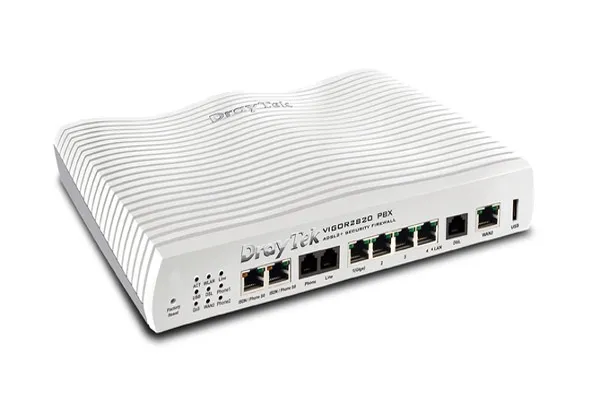
This device's IP PBX feature set is ideal for a small office. Although it's not as powerful or flexible as advanced dedicated IP PBX systems, it's incredibly simple to set up and did everything we asked of it. Call quality was excellent and we had no problem using it with our usual VoIP phones and softphones. The Vigor's capabilities as a router are as simple and effective as its IP PBX features. There's remarkably little on market to compare it to, as this is the first device we've seen from a major manufacturer to combine a router with an IP PBX. At around £370, it costs a little over twice as much as Draytek's standard Vigor 2820 router. Although it may be possible to buy a similarly specified dedicated IP PBX appliance and a separate router for a little less, configuration will certainly not be as simple as it has proved to be with the VigorIPPBX.

In addition to the usual URL, keyword and category based website blocking, the router's firewall allows you to block P2P and internet messaging for specific clients and protocols. This is helpful if, for example, you wish to block P2P file sharing via Kazaa but require BitTorrent traffic to still go through. Instant messaging blocking is even more refined, allowing you to not only block specific clients or protocols, but also to allow some features of a client (such as messaging and voice communication under MSN) while blocking others, such as video messaging or games. Several web-based messaging services can also be blocked, as can Skype or SIP VoIP traffic. The firewall settings also allow you to enable protection against a wide range of Denial of Service attacks.
In the menu below, the IP Objects settings enable you to group together different ranges of internal or external IP addresses, protocols, services, or even file types to make it easier to apply firewall rules. In the following Bandwidth Management menus, the Bandwidth Limiting settings are handy if you want to limit the amount of bandwidth made available to certain IP ranges, either permanently or on a set time schedule.
You can also limit the number of sessions permitted to a specified IP range. Time scheduling can be applied to these settings. Quality of Service (QoS) options can be set, but these require fairly in-depth configuration, as there aren't any pre-set categories to make it easier to prioritise different types of traffic.

-
 A spate of cyber attacks has rocked Japan – and it's spooked lawmakers
News With over 100 cyber attacks impacting major sectors this year, Japan’s ruling party is calling for an emergency taskforce to strengthen AI defenses
-
 TrendAI targets open weight model gains with Nvidia Nemotron deal
News The firm said the move allows customers to run AI-driven security entirely on infrastructure they control
-
 88% of UK firms have had an “agentic security incident” in the last year – ServiceNow warns more will come
News Concerns are growing over the scale of adoption and an inability to match “machine-speed” capabilities


