Kyocera Mita KM-8030 review
If your business needs include high volume speedy A3 printing, this Kyocera deserves consideration.
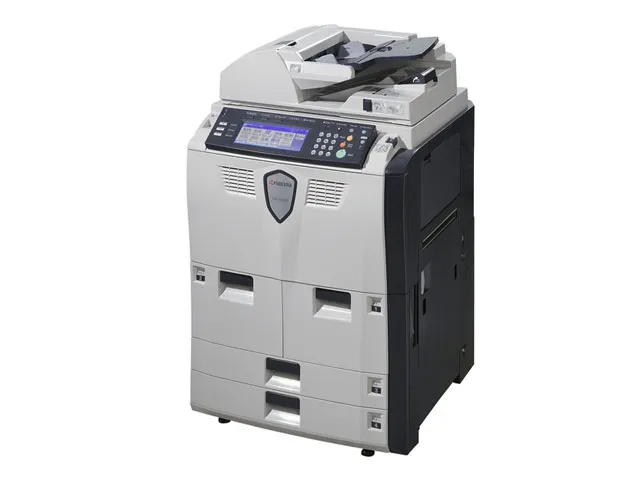
This is more than just a printer; it's a document management system. Thanks to its versatile scanning and copying facilities, its extensive collation and finishing options and its impressive speed and flexibility it will certainly improve in-house document production in a busy corporate department or reprographics business.
Kyocera, the printer maker, married Mita, the copier company, eight years ago and, although all its high-end printers are sold under the Kyocera brand, there's more than a little of the departmental photocopier about the KM-8030. Given the facilities of this multifunction machine, its basic size seems quite modest. It can handle A3 sheets with ease - both printing and scanning - and prints A4 pages in landscape mode for increased throughput.
The machine comes as standard with five paper trays: two 1,500-sheet A4 trays sit side by side under the printer engine, with two 'universal' trays, capable of taking paper up to A3, below those. There's a multi-purpose tray at the side of the device, which can take a further 100 sheets of paper or card up to 200gsm.
On top of the printer section is a flatbed scanner, which can take A3 sheets, too. The Auto Document Feeder (ADF) takes up to 200-sheets and can scan both sides of each sheet in a single pass, with it duplex scanning heads.
This is as much a standalone copier as it is a printer or scanner and scan and copy jobs are controlled by a large, blue and white touchscreen, which can be tilted back and forward for optimum viewing. Kyocera Mita has made a good job of the screen design, with plenty of well-drawn icons and animation. Open the front cover of the machine, for example, and you're given instructions on clearing paper jams - though we didn't have occasion to clear any while testing the KM-8030.
As well as choosing common job types from touch menus, such as printing two pages on one sheet or producing duplex documents from single-sided originals, you can define your own special tasks, which can be saved on the machine and recalled each time you want to use them. Although there's no facility for secure 'walk-up' printing from a flash drive, you can direct a job to the printer and hold it until you're at the control panel and have entered a password, before printing. This is useful for printing confidential documents in a departmental setting.
Sign up today and you will receive a free copy of our Future Focus 2026 report - the leading resource for IT decision-maker insight on priorities and investment areas in AI, security and more.
-
Cisco just launched two cyber-focused small language models: Antares-350M and Antares-1B aim to supercharge codebase analysis – and they run at a “fraction of the compute expense” of popular frontier modelsNews The Antares models unveiled by Cisco aim to cut costs in codebase analysis
By Nicole Kobie Published
-
AI is changing team structures in cybersecurity and creating new roles – here are the jobs in hot demandNews SANS Institute notes that companies are reworking security teams and salaries are going up
By Nicole Kobie Published
-
AMD adds Microsoft to its growing roster of Helios customers as firm launches three new VMs for Azure usersNews The collaboration marks the latest big tech customer for AMD’s “game changer” Helios system
By Ross Kelly Published