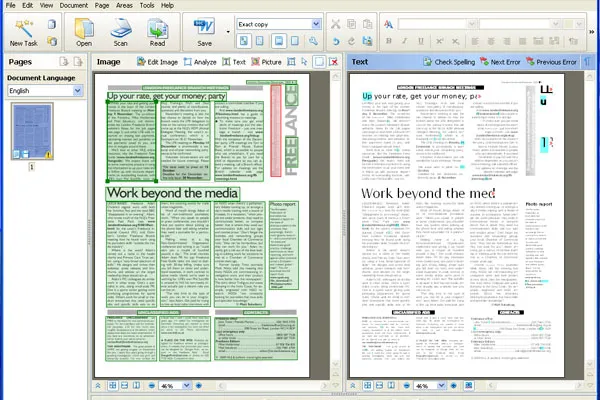
At the bottom is a magnified image of the bitmap page, which can be drawn up like a shutter, if needed, so spelling queries from the program can be checked against the original. On the extreme left is a column of thumbnails, so you can easily switch between pages in a multi-page document. With an Automatic Document Feeder on a scanner, multi-page documents can be scanned and OCRed as batch jobs.
Click on the Open icon to call up a file containing an image, either from a previous scan or from a photo, or the Scan icon to link directly to a scanner connected to the PC. The program then picks out the areas of the page which it sees as text and recreates them as frames containing live text in the right-hand panel. It also duplicates images of any bitmap data it can't see text in.
Our test system was originally connected to one of Kodak's latest ESP 5250 all-in-one printers, but we kept seeing internal scanning errors when trying to scan pages through FineReader 10 even though the same device scanned into PaintShop Pro without error. We switched printers to a Canon PIXMA MP640, which worked without problem.
The accuracy of Finereader 10 is good when recognising bulk text and we had near 100 percent correct translation to editable text. When it comes to formatting, though things aren't as good. We tried several different documents, from straight reports to multi-column newsletters and were disappointed with the reconstruction of layouts.
Headlines were reproduced in point sizes different from the originals, in some cases being put in text boxes which were too small, so the internal text was truncated. A column of text that in the original was justified, reproduced ranged right in the OCRed copy and Finereader 10 Professional used text boxes to reproduce columns in an original.
The use of text boxes may not seem a problem, as long as the format is preserved, but rival products, particularly OmniPage 16 Professional, are moving to the use of columns to handle columnar text, because it's so much easier to edit the result; columns can be linked, so text can flow from one to another.
Finereader 10 also had trouble with some coloured text, completely ignoring characters printed in orange in an original, even when we highlighted them manually as a text box. For comparison, this was again something OmniPage had no trouble with.
Finereader 10 Professional includes Adaptive Document Recognition Technology (ADRT), an ABBYY technology which the company claims recognises headings, headers and footers, page numbers and footnotes in multi-page documents. This might be of more use, if the program handled some of the layout basics better.
Verdict
This is a versatile application, able to create PDF, Word, Excel and HTML documents directly. Although it handles basic character recognition well, in our experience, it’s handling of page layouts is much less good. We’d therefore only recommend it for converting pages with comparatively simple designs.
Processor: 1GHz OS: Windows XP, Vista, 7, Server 2003 Memory: 512MB available Display: 1,024 x 768
 eSentire partners with CMS Distribution to expand UK and Ireland channel reach
 ‘Attackers are steering their botnets with greater precision and control’: DDoS attack numbers might be dwindling, but they’re intensifying
 Oracle expands HPE Juniper Networking deal to support AI infrastructure build-out

