HP's EliteBook X G2i 14in is the featherweight champion of CES 2026
A superbly light and attractive notebook with a great keyboard and bright display

-
+
Beautiful design
-
+
Bright, vivid display
-
+
Great keyboard
-
-
Model tested is a prototype with no benchmarks

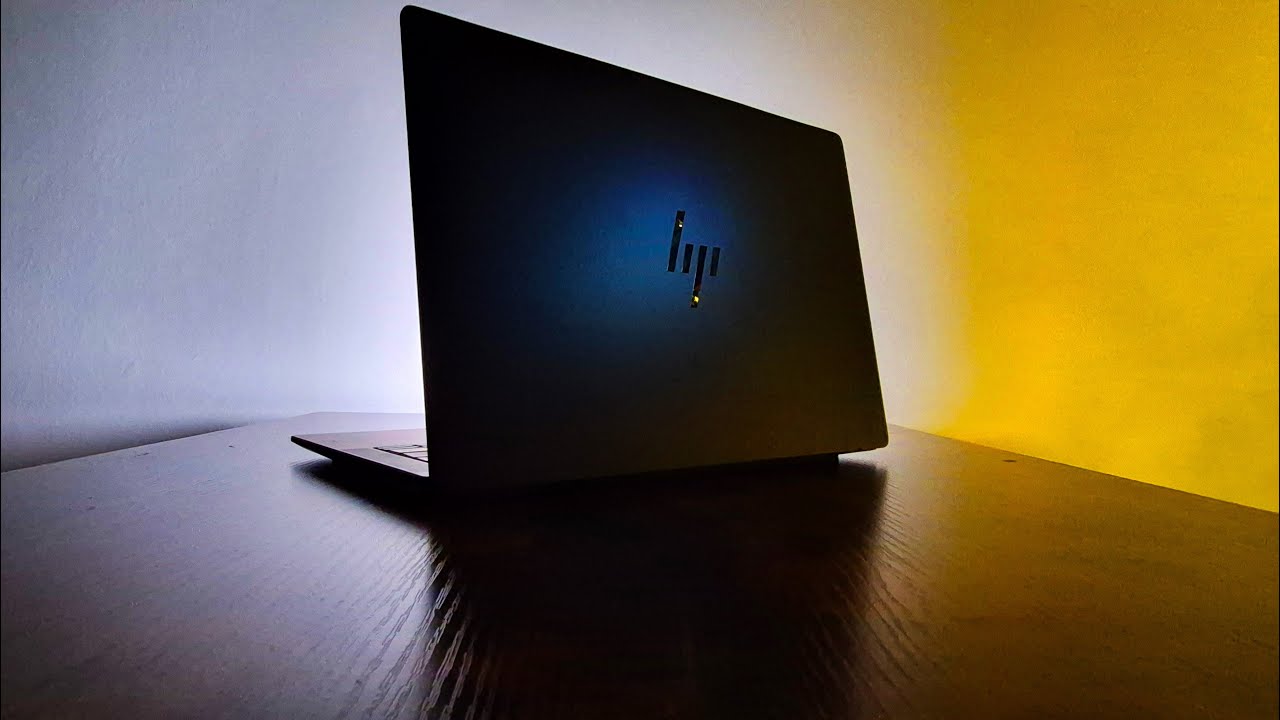
Ahead of CES 2026, HP gave ITPro the chance to try out its new EliteBook X G2i notebook. There are three versions of the X G2i notebook: a Flip model and two clamshells with different configurations. Here we have the lightweight configuration of the clamshell, which came in 'Atmospheric Blue'.
This is a prototype and HP has asked that no benchmarks be published. As such, this review will offer an opinion on its design and performance; we will base the latter on our in-house test results without mentioning the specific benchmarks.
HP EliteBook X G2i 14in: Design


The lightweight clamshell model of X G2i is undeniably beautiful. It's a sleek unit, finished in navy, with a few understated logos dotted around – nothing, aside from the HP icon on the lid, pulls focus. Even the extravagant 'EliteBook X' branding is kept in an unobtrusive position, under the keyboard.
Remote and hybrid work has clearly influenced the design, as it weighs just 999g. It can be carried effortlessly in one hand, pulled out of a rucksack with absolutely no resistance, and even opened up with one hand.
What's more, as an HP device you know sustainability is prioritised and the G2i has been made with around 90% recycled magnesium. Recycled plastics have also been used in the bezels and keyboard, which is top-mounted for easy access should it need replacing.
HP EliteBook X G2i 14in: Display, keyboard, and trackpad
The X G2i has a 14in, 3K OLED display, with a 2880 x 1800 resolution and a smooth 120Hz with Anti-Glare technology. The whole device has around a 90.08% screen-to-body ratio, with very thin bezels encasing the display.
There will be some bugs or improvements to come once the production model is released but we have to say that, based on our experience with the prototype, the screen is bang on the money. With our colorimeter, the X G2i showcased some impressive scores, particularly for gamut color coverage and Adobe sRGB – both of which were higher than HP's tests had suggested. The panel is also very bright – HP says it can reach 500 nits, which is close to what our in-house tests reached.
There is a redesigned keyboard with deeper, more comfortable keycaps and, according to HP, enlarged keys "where it matters". To be honest, that description suggests there are massive, unusually sized keys, but that isn't the case. Everything looks as it should, though the keys are over all much larger than one would find on an equivalent MacBook or XPS. We found it to be really great for typing, very comfortable, with punchy keys that have plenty of travel. Similarly, the large haptic trackpad is also a delight: it's smooth, expansive, and has a satisfying click action.

HP EliteBook X G2i 14in: Specs and performance
Inside the HP EliteBook X 14 is an Intel Core Ultra X7 358H chip that clocks at 1.90GHz. Our prototype unit has 32GB of RAM, though the lightweight configuration can have 24GB RAM and up to 1TB of storage.
The G2i is fun to use, great for editing photos, responding to emails, and maintaining a website – by which we mean nothing really pushed its processor too hard and it handled all we could throw at it with barely a hum of distress.
In our looped video test, the X G2i's 56Wh polymer battery lasted fairly well. While we can't specify how long, we can say it doesn't disappoint and in day-to-day use it lasted well beyond the average work day. It isn't in the same league as HP's OmniBook 5 but once again this is a prototype, so that might change on full release.
Feature-wise, the G2i is stocked with some nice capabilities, such as Wi-Fi 7 and Bluetooth 6. You also have a 5MP webcam with AI Presence Detection and voice enhancement, both of which work really well.
For ports, there is a nice balance, with three USB-C ports (two on the left, one on the right), and one USB-A (on the right). There's also a security lock slot, an HDMI 2.121, and an optional SIM card slot. What more could you want? A headphone/mic combo jack? Well, it has that too.

HP EliteBook X G2i 14in: Is it worth it?
It is both fantastic and frustrating to have the opportunity to use a prototype before its full release and we thank HP for the opportunity. We really need a full set of benchmarks to recommend any device but we can't help but be excited for the G2i.
At face value, it's gorgeous, it's super light, the keyboard is satisfying, and the OLED display is superb. Of all the lightweight notebooks we've seen at CES, this is one of the best and one to keep an eye out for later in the year.
HP EliteBook X G2i 14in specifications
CPU |
Intel Core Ultra X7 358H (1.90GHz) |
Row 0 - Cell 2 |
GPU |
Intel Arc B930 |
Row 1 - Cell 2 |
Display |
14in, 3K OLED (2880 x 1800), 120Hz, Anti-Glare, 500 nits |
Row 2 - Cell 2 |
RAM |
32GB |
Row 3 - Cell 2 |
Storage |
954GB |
Row 4 - Cell 2 |
Connectivity |
Wi-Fi 7, Bluetooth 6 |
Row 5 - Cell 2 |
Ports |
Right side: 1 x USB Type-C, 1 x USB Type-A, 1 x Security lock slot, 1 x Nano, SIM card slot. Left side: 2 x Thunderbolt 4 with USB Type-C, 1 x HDMI 2.141, 1 x headphone/mic combo jack. |
Row 6 - Cell 2 |
Dimensions |
312.7 x 219.9 x 9.15mm |
Row 7 - Cell 2 |
Weight |
999g |
Row 8 - Cell 2 |
Operating systems |
Windows 11 Pro |
Row 9 - Cell 2 |

-
 16-year-old boy arrested for masterminding KillSec ransomware group
News Police have taken control of KillSec's leak site, securing at least 110 terabytes of data against further unauthorized access
-
 Chinese hackers impersonate leading AI figures to harvest credentials
One phishing incident saw email recipients invited to join an AI policy advisory committee
-
 New Omdia study shines light on Kaseya's unified IT service delivery platform
News MSPs save more than $310,000 on average per year after standardizing on the vendor's offering, according to the findings


