Parallels Desktop 4.0 Switch to Mac Edition
If you've been enticed by the world of Mac, but still need to run your PC business applications, Parallels has the answer. We review Parallels Desktop 4.0 Switch to Mac Edition.
Parallels 4 Switch to Mac Edition does make it easier to move from a PC to a Mac, but there are still a few creases that we'd like to see ironed out.
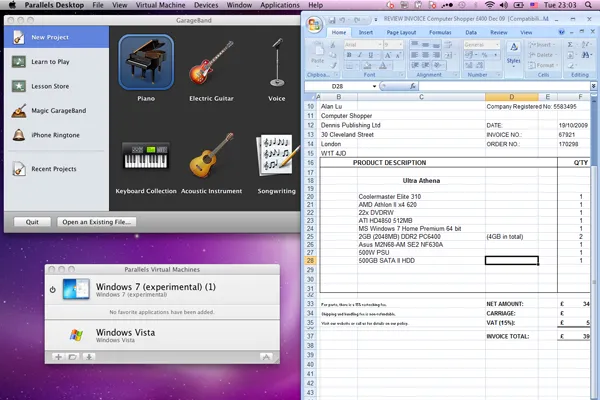
By default, Windows runs inside its own window on your Mac desktop. It can also occupy the entire screen or run in Coherence mode where the Windows desktop disappears and Windows programs run alongside Mac programs on your Mac desktop. The Start Menu appears in the Dock, while System Tray icons appear in the MacOS menu bar. It works fairly well, but Windows applications can't be moved to a second display. They do work with the Mac OS' Expose and Spaces windows management features, but sometimes suffer from graphical glitches.
Integration between Windows and the Mac OS works well, but there's room for improvement. When a USB device is connected, Parallels asks which operating system you'd like to use it with. DVD drives can be tied to one OS or the other, while Windows hard disks and folders appear on the Mac desktop and vice-versa, so files can be shared easily. Oddly, only plain text can be copied and pasted between operating systems images aren't copied and styled text loses its formatting. Windows 7 support is present but is considered experimental'. We weren't able to complete certain tasks with Windows 7 that we could with Vista, such as printing.

Parallels Desktop 4.0 Switch to Mac Edition is a useful bundle of software and hardware for inexperienced users switching to the Mac. More experienced users can save 20 by opting for the standard version which lacks the USB transfer cable and video tutorials. As a virtualisation program, it still has several rough edges even after four major versions which is disappointing.
A cheaper alternative is Virtual Box which has fewer features and has no formal support, but it is free.
Verdict
Parallels 4 Switch to Mac Edition does make it easier to move from a PC to a Mac, but there are still a few creases that we'd like to see ironed out.
CPU: Intel processor Host operating system: MacOS X 10.4.11 or later Memory: 1GB RAM (2GB recommended) Storage: 15GB hard disk space for each virtual computer Installation: CD-ROM drive, 450MB of hard disk space
-
 Anthropic teams up with Akamai in $11.6bn cloud partnership
News The expanded deal will help Anthropic meet “accelerating CPU workload demands”
-
 OpenAI and Anthropic could withhold new AI models from UK's AI Security Institute
News The move marks the second time Anthropic declined to submit a model for testing in the space of a month
-
 How CISA plans to shake up the CVE program
News CISA will sharpen its focus on program governance, ecosystem participation, data infrastructure, and CVE record content


