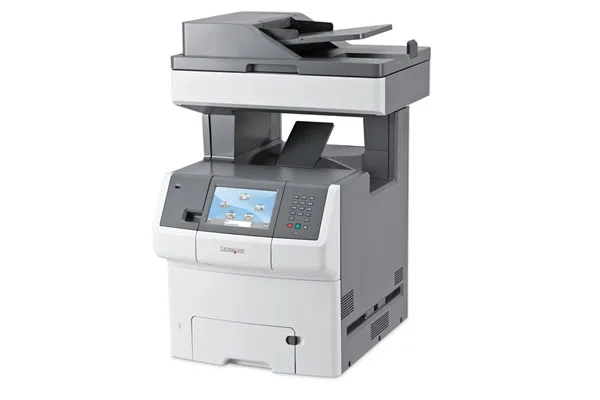
A fully network-aware multifunction printer can do a lot more than handle all the printing from a workgroup. The new breed of machine, typified by the Lexmark X736de, provides control through a colour touch-screen and duplex scanning and copying.
It's designed to save energy and costs and to provide the flexibility of custom-written applications, which can be added to the machine's main, graphical menu system.
The large screen of the printer works through a series of virtual buttons and icons to control simple tasks like copying and faxing, but also to work through job queues and schedule printing. There's a USB drive slot on the front panel and, assuming a person has the correct privileges, walk-up printing of documents and images is supported too.
Remote access to the front panel of the printer is available through the supplied monitoring software, which is also security protected, so access can be restricted to staff on a need-to-use basis. Help for busy IT departments is also provided by traffic-shaping technology, which packets large documents emailed from the 600dpi scanner, so they don't hog the network. It may sound like a small, geeky feature, but it can make a big difference to the overall performance of a network.
You can have a lot of fun with the printer's graphical interface, with many Lexmark resellers prepared to help with customisation or even to produce complete applications from scratch. Typical uses are to provide branded screensavers or even to feed information, such as RSS feeds, through to the printer when it's not in use.
There's quite a bit of flexibility in how you feed paper, too, with a 550-sheet paper tray and a 100-sheet, pull-down multifunction tray as standard and options for three more 550-sheet trays, or a 2,000-sheet high-capacity feeder. It's a bit odd there's no similar expansion on the output side, with collators or multi-bin sorters, but Lexmark argues that in many workgroups, there's little need for one.
Lexmark claims speeds of 33ppm for black and colour print, at the machine's default resolution of 1,200dpi. Our five-page, black text document gave 13.6ppm, but this increased to 22.6ppm when we printed the 20-page test. Even so, it's some way short of the headline figure. Our five-page text and colour graphics test gave 16.7ppm, surprisingly faster than the black text test of the same length.
 Salesforce doubles down on forward deployed engineers in UK Agentforce push
 UK SMBs are the most vulnerable to cyber attacks
 Workers are so keen on using AI at work that they're paying for it themselves

