Nokia N900 review
The N900 is Nokia’s most hyped phone this year, running on the Linux-based Maemo OS. Does it show that Symbian should be scrapped or is it just another touch screen disappointment? We review the N900 to find out.
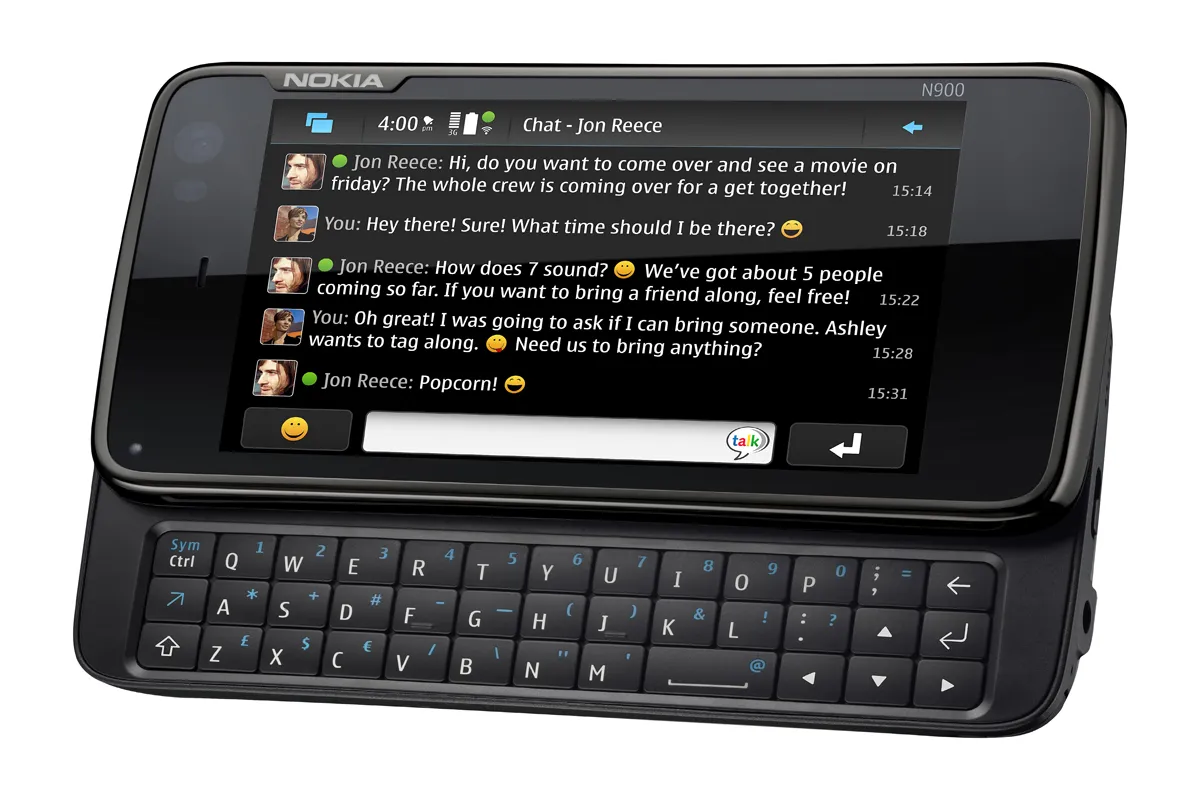
Taking into account the Nokia N900 we were using was a pre-production sample, the handset looks like it could certainly be a strong contender for the smartphone OS crown. The screen may be a little unreliable, but if Nokia can upgrade this to a capacitive one on future Maemo handsets, we would certainly see the platform as Nokia’s saviour.

It took us a while to get used to the interface itself, and this is because it's quite different to any smartphone OS already available.
Like Windows, apps and features use the x' icon in the top right hand corner that you tap to close an app. However, we found that making the x' appear was quite awkward, as different strokes make it appear in different applications.
For example, you'll have to tap an icon at the bottom of the browser window to make it appear when surfing the net, but to exit other apps and the menu you'll have to tap on various parts of the screen to bring the icon up.
One of the more successful aspects of the Maemo 5 OS is the application switcher. The Nokia N900 has been built to host a huge number of applications, and have them running together.
The ARM Cortex A8 600 MHz processor is suitably powerful to do this, although a nudge from a more robust one would be welcome (say for example, Qualcomm's 1GHZ Snapdragon processor).
It is, however, the OS that ensures as much space on the device is reserved for running applications smoothly, which makes it such a success.
We were testing a pre-production N900, and pre-production samples are well known for their unreliability, but ours didn't struggle at all with speed as we have so often encountered with Symbian devices.
The application switcher goes some way to ensure that it's simple to switch between applications once you've opened them all and have them running together. To access the switcher, you simply need to tap on the icon that looks like two rectangles overlapping. You'll then see a selection of mini windows appear each of these represents the applications you have open.

-
 ‘This is a massive change’: PagerDuty wants to supercharge incident response with a new SRE agent and command center
News The new Paige agent from PagerDuty will act as a digital assistant for teams battling incidents
-
 ‘Organizations need to help developers grow alongside the technology’: Dejected devs lament career prospects amid AI advances
News A new survey has found that AI is fundamentally changing the developer role and many are getting anxious
-
 French blood service hit by cyber attack threatening to turn stocks into “black pudding”
News The attack on cold rooms at Coolworld happened the same night as attacks on fridges in Benelux and Sweden


