The Balance Phone helped me reclaim my attention span – but I would rather have a better handset than the Samsung A16
Blocks on social media, streaming, and infinite scrolling through a stylish user interface that sits on top of Android

-
+
Does what it promises – gets you free from social media and endless scrolling
-
+
Simplified interface with a memorable look
-
+
Helpful notifications and tracking
-
-
The lower-spec A16 model has limitations

The Balance Phone has arrived during a significant moment, particularly in the UK and Europe, where there is a swelling of anti-social media sentiment. People are claiming back their attention spans, parents are worried about screen time, and even politicians are making moves towards legislation.
Driving much of this is a big community on social media (ironically). Marketing for Balance has been phenomenally successful at using the power of that space in its attempt to take you off it.
It promises to get you down to just 1 hour and 30 minutes a day of phone use – we will be adjusting that somewhat as I use my phone for work, and this is, above all, a review of a phone for work purposes. However, this is not simply a review of a device but a review of my relationship to phones in general. The way the Balance Phone is presented, and even designed, is to be an antidote to digital procrastination. That's the biggest reason you will buy it. So there is going to be a significant amount of navel-gazing here.
In the five days I used my iPhone before switching to the Balance phone, I had a daily average of seven hours of use. I picked up my phone on average 65 times per day – total pickups for the week were 259 times. Most concerning, I racked up over seven hours on Instagram – I'm an addict. That's over 28 hours of screen time in less than a week, and that doesn't take into account TV, tablet, laptop, and any other devices I encounter.
Balance Phone: Design
When ordering a Balance Phone, you have three options. There's a standard model, which is the Samsung A16 (£269). This is a budget model you would likely give your children as a first device. Or you can buy a 'Pro' version that's a Samsung Galaxy S25 (£679/$813). Or you can simply subscribe to their service and have it installed on your Samsung device of choice (£69/$99 per year). A word of warning here: if you opt for the subscription, you won't be able to change your phone back once the OS is installed.
I was sent the A16 model and, admittedly, most of the negatives in this review are due to the fact that it's a low-spec device, rather than any issue with Balance itself. I like premium features and top camera specs, and I felt a little limited with the A16. This also became a slight issue for work, which I will explain further down.
How does Samsung fit in? Well, the premium quality of its hardware is a big factor, but also its strong security controls through the Knox platform. The Balance team did initially seek to make their own hardware, but found it difficult to come up with something that competes with what is already available. So rather than spend more time and money on a development that might not work, they partnered with one of the world's biggest smartphone makers.
With the A16, you get a 6.7in Super AMOLED display, 1080 x 2340 resolution, and a 90Hz refresh rate, which isn't so important without social media and infinite scrolling. It's powered by a 6nm MediaTek Helio G99 processor. There is only 4GB of RAM and 128GB of internal storage. It runs Android 16 out of the box and then a Balance OS overlay.
You also get facial recognition and fingerprint sensors. The latter is on the home button and doesn't always work – particularly in a sweaty heatwave. But this is more of an issue for the Samsung model rather than Balance.
For the camera, you have a 50MP wide lens, a 5MP ultrawide one, and a 2MP macro sensor on the rear. The front-facing camera is 13MP, also wide. Both sides shot 1080p video at 30fps – which is significantly less than the standard S25 offers. Worth bearing that in mind if you need the camera system for your job.
Balance Phone: Operating system

As mentioned, Balance is merely an operating system, or more accurately, an overlay. When you set up your phone, you'll notice it has a basic Android background and user interface. Before long, you'll have a pop-up that leads you through the setup process for Balance. This will ask you to allow notifications and permissions for Balance so that it can help you if your usage spikes.
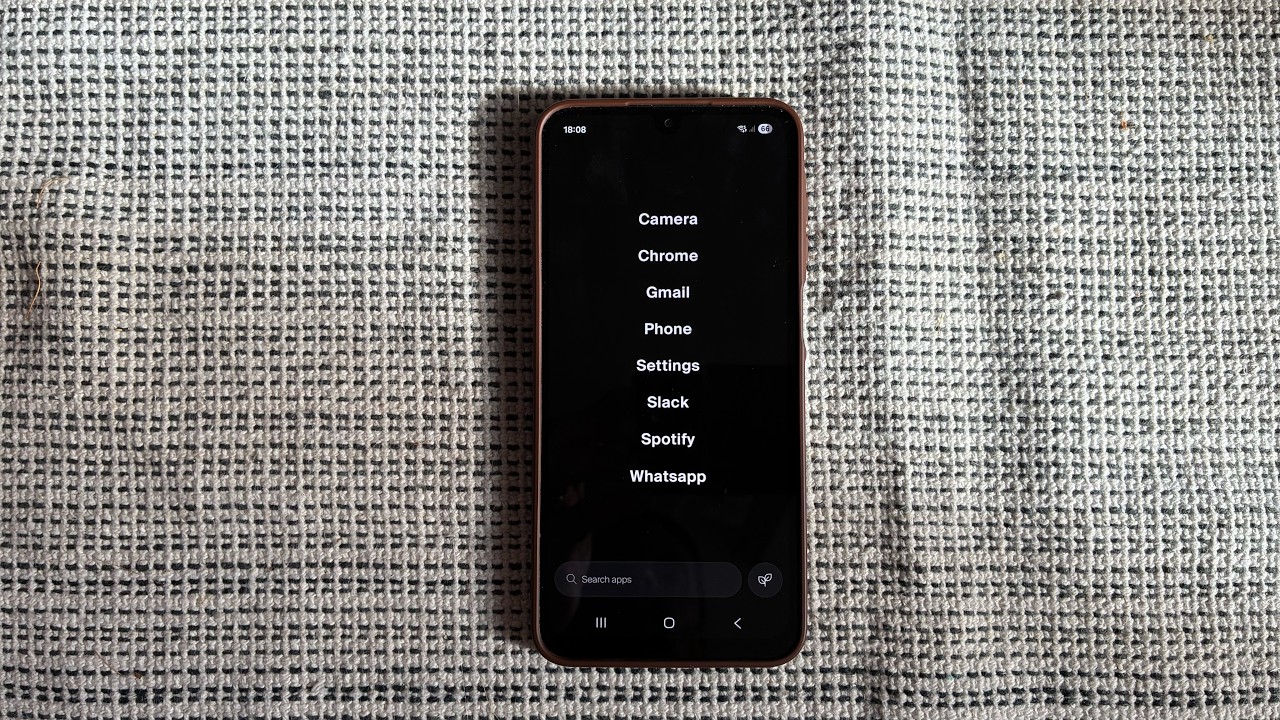
One of the first things you'll need to do is select eight apps or features to appear on your home screen. This will be a minimalist black screen with the names of each app in white, listed down the center. It's quite clever in that it looks less cluttered than your usual phone screen, which is just all your apps spread over many pages. It's both instantly calming and very memorable. It unintentionally stands out from every other phone available, just by being stripped down and basic.
If you want to access something other than the eight apps selected, you use the search bar at the bottom. Which can get annoying if you need something you only use infrequently – say, the app for your weekly shop. But overall, you only really use a selection of apps daily, and that should be fewer than you think without social media.
The OS was initially an app, available via the Google Play Store. It was also briefly a hardware concept, with models designed in China, but their idea is more about software, anyway.
The name is key; it strikes a balance through app categories - mainly anything that offers an infinite scroll. The company defines this via five categories: social media, streaming, gaming, gambling, and porn. Admittedly, email and instant messaging can be classed as infinite, so to speak, but there is more caution here. Telegram, for instance, is straight-up banned because it isn't as safe and has a known problem with illicit content. WhatsApp, on the other hand, is allowed because, to quote the company, it's simply too big not to include.
When it comes to news apps, there is more leeway, but they're working on features that can help you curb your news usage. Though this will be more of a guide, you'll likely have notifications that warn you how much time you've spent doomscrolling.
My first impression of the Balance Phone is one of calm. It's very easy to get distracted once you pick up your phone. Whatever your initial reason for unlocking your device can be lost as you see notifications, other apps, and horrible news stories. When I opened the device to check email and Slack for work, that is generally where I went. So there was a feeling it was doing its job from the start.
Balance Phone: Apps and features
What about the delicate balance between useful apps and procrastination? Well, work apps and necessary utilities are all available – as far as my own needs go. Banking, messaging, Uber, and even Alexa are all present. Google Search is installed, but it isn't available; it's merely kept in place to support other services on the device. You can only use Chrome or Ecosia.
Apps like Netflix and YouTube are blocked from being downloaded, which is generally the case for all streaming apps. Even BBC iPlayer and ITVX, which were a struggle not to have during a World Cup. Strangely, YouTube Music is available, as is Spotify. The latter has a scroll feature, but music has a therapeutic quality and can also aid productivity, so it makes sense for it to be a part of the Balance-approved apps.
Some apps, however, regardless of the infinite scroll/social aspect, are just not available. The Blackmagic camera app, for example, which has become the creator's best friend, could not be added to my Balance Phone. This is largely down to the model of phone and not the Balance Phone criteria. Either way, it would be something that informs my choice when buying a Balance Phone.
Balance Phone: Is it worth it?

There is definitely something to be said about the lower quality of the Samsung A16. The OS doesn't feel particularly fast or responsive, particularly in apps. I noticed lots of sluggishness in Slack when iterating in channels or leaving them. The fingerprint sensor hardly worked. And there is a slightly glitchy action in Spotify and Gmail. One would assume this is not a problem for the S25 model and its higher-powered chipset.
As for Balance itself, it does indeed do what it promises. You will not use social media – largely as it doesn't let you. But beyond that, the way in which the interface looks and operates does appear to be a better way to use phones for work. You're not lost among pages and pages of apps; instead, you're forced to be more organized, and you can do the task at hand quicker, with less distraction. This is the true meaning of work-life balance.
Balance Phone (Samsung A16 model) specifications
CPU |
MediaTek Helio G99 (6nm) |
Row 0 - Cell 2 |
Display |
6.7in Super AMOLED display, 1080 x 2340, 90Hz |
Row 1 - Cell 2 |
RAM |
4GB |
Row 2 - Cell 2 |
Storage |
128GB |
Row 3 - Cell 2 |
Cameras |
Rear: 50MP (wide), 5MP (ultrawide), 2MP (macro). Front: 13MP (wide) |
Row 4 - Cell 2 |
Connectivity |
Wi-Fi 802.11, Bluetooth 5.3 |
Row 5 - Cell 2 |
Ports |
USB Type-C |
Row 6 - Cell 2 |
Dimensions |
164.4 x 77.9 x 7.9 mm |
Row 7 - Cell 2 |
Weight |
200g |
Row 8 - Cell 2 |
Operating system |
Android 16 – Balance OS |
Row 9 - Cell 2 |

-
 UK tech execs call for £20 billion investment in sovereign AI
News In an open letter to the government, they say the UK risks losing resilience and influence
-
 UK employers look to expand tech teams before year-end
News New research shows, half of UK businesses are looking to recruit security, AI, and cloud experts
-
 Opengear pens first European distribution deal with Ingram Micro
News The agreement will expand the availability of the vendor's network resilience solutions across the continent


